





Can I Edit My Username or Email Address?



Short answer: not directly from your profile.
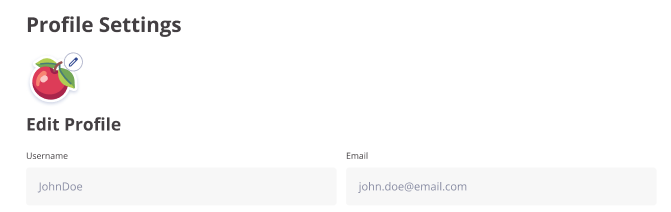
Both fields are visible on the Profile Settings page, but they're locked. You can see your current username and email there, but the inputs are read-only. There's no edit button, no pencil icon, no way to "save changes" for either.
If you absolutely need to change one of them, send us an email at support@slotsmate.com with your current username and the email address associated with the account. Explain what you want changed and why.
We handle these requests case by case rather than building them as a self-serve feature.
Why We Lock These Edits
Your username is your identity on the community leaderboard. This is how you are identified by other members on SlotsMate, whether on the leaderboard, in game reviews, or in other areas.
Changing it would mess with leaderboard history, profile links, and anything other community members use to find you. Letting people swap usernames freely also opens up a few abuse paths we'd rather not deal with.
Your email is the recovery anchor for your account. If someone briefly gets access to your account and changes the email before you notice, you'd be locked out for real. Keeping email changes out of the self-serve interface is a trade-off in favor of stronger account security.
Friendly Advice from the SlotsMate Team
Pick a username at signup that you'll still want in two years. Avoid anything tied to a current job, a relationship, a year, or anything else with an expiry date. "DragonSlayer2026" looks great in 2026 and weird forever after.
Use an email you actually check and plan to keep. The one you'll still have access to in five years. Throwaway addresses are a fast path to permanently losing access to your account if you ever forget your password.
Related: How can I change my account details? · I don't remember my username, how can I get it back?
Page Contributors