





How Can I Change My Account Details?



Head to Account Settings from the top right corner of the top navigation bar. Two sections live there: Edit Profile and Reset Password. We’ll explain both of them below.
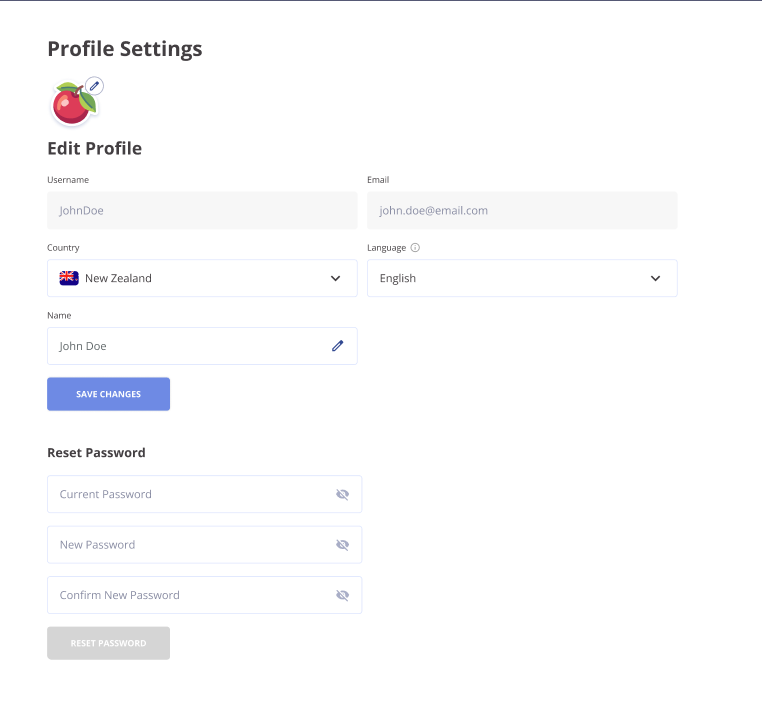
Edit Profile
This is where most of your account details get updated. Here's what's editable:
- Avatar. Click the pencil icon next to your current avatar. Pick a new one from the SlotsMate library and save.
- Country. Pick from the dropdown. This is the country we associate with your account for community and regional context.
- Language. Pick from the dropdown. This is the language we will use in future email communication.
- Name. Your real name. It is a personal label on your profile. Different from your username, which is what shows up on the leaderboard. Click the pencil icon in the field to edit, then save.
Once you've changed anything in this section, hit Save Changes at the bottom of it. The button stays inactive until there's actually something to save.
Reset Password
Separate section, separate flow.
- Type your current password.
- Type the new password.
- Type it again to confirm.
- Hit Reset Password.
Use the eye icon next to each field to peek at what you've typed. Saves you a lot of "why isn't this working?" retries when a typo hides behind the dots.
Note
The Reset Password button stays greyed out until all three fields are filled in.
What You Can't Change Here
Two things on the page are locked: username and email. We don't allow direct edits to either from Profile Settings. If you absolutely need to change one of them, ping support and explain the situation. We handle these case by case rather than baking them into the UI.
This is intentional. Username changes affect your leaderboard identity and history. Email changes affect account recovery. Both are too high-risk to leave as one-click edits.
Related: Can I edit my username or email? · Can I change my user avatar?
Page Contributors