





I Don't Remember My Username. How Can I Get It Back?



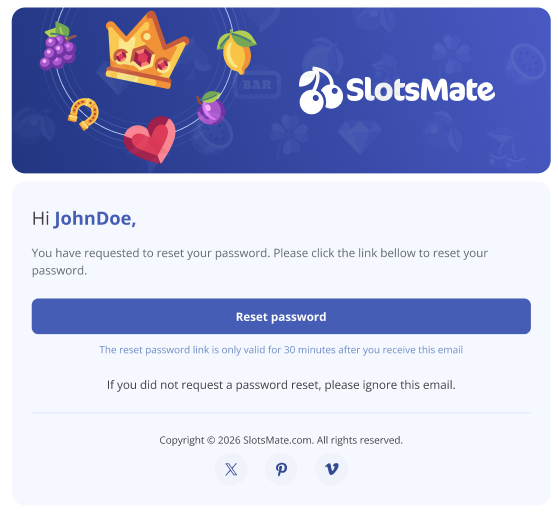
At the moment, the only way to find your username is through the password reset flow. It sounds backward, but this is the fastest way.
Here's the trick:
- Go to the Log In screen.
- Click Forgot Password.
- Enter the email you signed up with.
- Open the email we sent to that address.
- Your username is right there in the email (as you can see below)
Please note
If you only forgot your username and still remember your password, just close the email after you spot the username. You don't have to click the reset link or change your password. The information you needed is already in your inbox.
If you forgot both, click the reset link in the same email, set a new password, and you're back in.
Why It Works This Way
We don't currently have a separate "forgot username" feature. The password reset email also serves as the way to recover your username, since it's sent to the account's registered address and includes your username.
We know it's not the most obvious solution, but it works in one step.
If The Email Doesn't Arrive
Check spam first. Gmail and Outlook both like to filter automated email until they trust the sender. Look in spam, mark it as "not spam" if you find it, and future emails should land in your inbox.
Still nothing after 10 minutes? Try a different email you might have used at signup. People often have a primary email plus a backup, and it's easy to forget which one was used.
Keep in mind
If you have no idea which email you used and can't find any matching messages, ping support. Give them whatever info you can: rough sign-up date, any old usernames you might have tried, anything that helps narrow the search.
Related: I forgot my password · How do I log in?
Page Contributors