





What Are All the Things on My Profile Page?



Your profile is the hub for everything tied to your account: your stats, your gem balance, your reward claims, and the games you actually play. Here's a section-by-section tour.
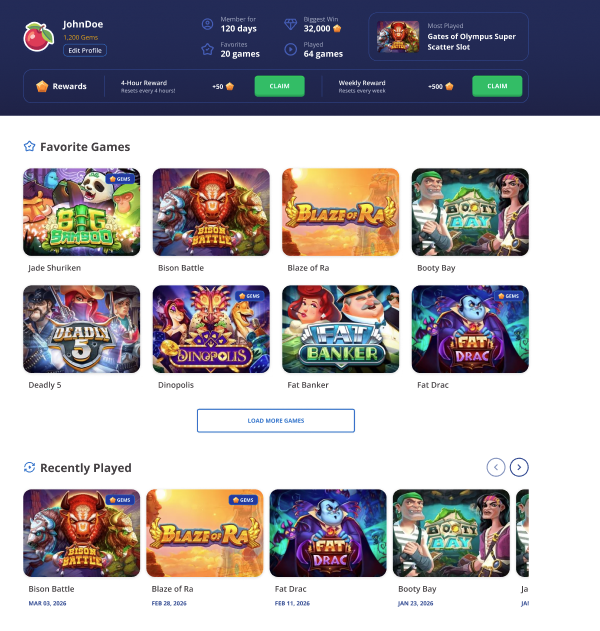
The Top Section (your identity and stats)
This is the dark band at the top. It packs in more info than it looks like at first glance.
Avatar, username, and Gem balance live on the left.
The Edit Profile button below your name takes you to Profile Settings, where you can change your avatar, country, language, and password.
The middle of the header shows four quick stats:
- Member for: how many days since you signed up. Pure vanity metric, but a fun one.
- Favorites: how many games you've heart-tapped.
- Biggest Win: the largest win you've recorded in Gem Play.
- Played: how many different games you've spun at least once.
Over on the right, the Most Played panel shows the game you've put the most sessions into. The thumbnail and title link straight to the game so you can jump back in with one click.
The Rewards bar
Right below the header, you'll find two claim buttons:
- 4-Hour Reward: claim +50 gems every 4 hours. The label tells you when it resets.
- Weekly Reward: claim +500 gems once a week.
When the timer is still counting down, the button stays inactive. When it's ready, it lights up green and says CLAIM. Hit it, the Gems land, timer resets.
Favorite Games
Below the rewards bar, this section shows every game you've added to your favorites, in a grid layout.
Games that can be played with gems show a small GEMS badge in the top-right of the thumbnail, so you can spot which favorites are gem-eligible at a glance. If you have more than the visible rows, hit Load More Games at the bottom of the section to expand the list.
Recently Played
Last section on the page. Shows the games you've spun most recently, with the date you last played each one. Use the left and right arrows to scroll through horizontally. Handy when you want to pick up where you left off without scrolling all the way through your favorites.
What's not on this page
A few things you might expect that live elsewhere: the full leaderboard is on the Play with Gems hub, Profile Settings hide behind the Edit Profile button.
Related: How can I change my account details? · How does the reward system work? · How do I favorite a game?
Page Contributors